
What a content audit actually tells you
Most websites are part attic, part storefront. Nobody plans it that way. The pages just pile up: the 2019 blog series, three versions of the same service page, product descriptions written by two people who never met. A content audit is how you sort the attic.
It has two parts. First, the inventory: a complete list of everything you’ve published, every page, post, and product description, in one sheet. Second, the assessment: you judge each item on four questions. Does anyone find it? Does anyone read it or act on it? Is it still accurate? And does another page already say the same thing?
That last question is where most of the value hides. Duplicates are the silent killer of content. Three pages competing for the same search term, and none of them winning. You’ll never spot that from the outside looking in. You only see it when the whole inventory is on one screen.
The strategy hiding inside the cleanup
Most people treat the audit as spring cleaning. That’s the wrong frame. The audit is a planning document. Every verdict is a decision about the next two quarters of your content.
Keep verdicts tell you what to protect. Update verdicts are content briefs waiting to happen: pages worth an afternoon because they’re already halfway there. Merge verdicts tell you which keywords you could actually own if you stopped splitting your authority across three pages. Delete verdicts tell you what to stop writing, forever. If a whole category of posts scores near zero, that’s the audit telling you your audience never wanted that topic.
My rule: fix what you already have before you write anything new. New content is expensive. Updating is fast, and the page already carries whatever trust it’s earned. Most sites can get six months of mileage out of an audit before they need a single new page.
How to run one, step by step
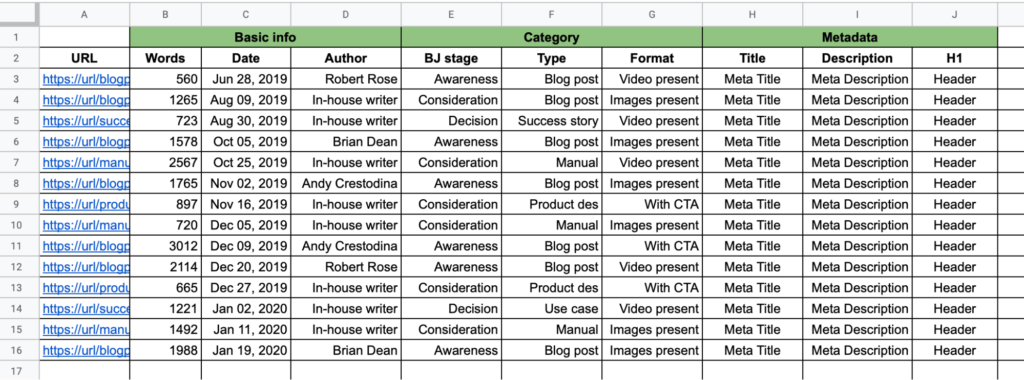
- Inventory. Pull every URL. On WordPress, the fastest free route is Screaming Frog’s free tier (it crawls up to 500 URLs) or your XML sitemap, usually at yoursite.com/sitemap_index.xml. Log every row in a spreadsheet with these columns: URL, title, content type, word count, last updated, sessions for the last 6 months, conversions or goal completions, backlinks, and owner. Pull sessions from Google Analytics and backlinks from Search Console’s Links report. One row per URL, no exceptions. Include the tag pages and author archives too, if they’re indexed. They usually shouldn’t be, and the audit is how you find out. It should look something like this when it’s working: rows of pages, columns of numbers, no hiding.
- Score. Give every page 0 to 2 on each of the four questions. 0 is fails, 1 is weak, 2 is solid. Read the totals like this: 7 to 8 means keep, 5 to 6 means update, 3 to 4 means merge candidate, 0 to 2 means delete candidate. Simple enough to finish in an afternoon, honest enough to trust. And remember, traffic is a column, not the verdict. A page with forty visits a month and two clients to its name scores low on “found” and high on “read.” That’s a closer working in the dark, not a zombie. Check the conversions column before you judge.
- Hunt the duplicates. Duplicates hide, so go looking. Run Screaming Frog and sort by duplicate page titles. In Search Console, look for queries where two of your URLs both show impressions; that’s cannibalization, and it means you’re splitting clicks you could have kept. Or search site:yoursite.com with your target keyword and see what comes back. When two pages target the same term, keep the one with stronger backlinks and traffic, and merge the other into it.
- Verdict, and what each one actually means. Keep: leave it alone, revisit next audit. Update: refresh the stats, examples, and screenshots; check what the top three ranking competitors cover that you don’t, and add it; then update the publish date so readers (and Google) know it’s current. Merge: fold the weaker page’s content into the winner, then 301 redirect the loser to the winner. In WordPress, the Redirection plugin does this in about two minutes. Delete: the page has no traffic in twelve months, no backlinks, no conversions, and no strategic reason to exist. Redirect it to the closest live page or the category page. One rule covers all of it: never delete a page that has backlinks without redirecting it. A 404 on a linked page is you throwing away someone else’s vote of confidence.
- Work in payoff order. Update the quick wins first, merge second, delete last. Audits die when people start with the hard deletions and run out of energy. The quick wins fund the rest of the project. The fastest way to find them: in Search Console’s Performance report, filter for average position worse than 10 and sort by impressions. Those are the pages one good update away from page one.
Two mistakes that kill audits
Auditing without analytics. Opinions about pages are cheap, numbers are not. Hook up the traffic and conversion data before you judge anything, or you’ll delete pages that were quietly working.
Doing it once. A site drifts. Re-audit yearly, or right after any redesign, and compare the scores to last time. The second audit takes half the time and tells you twice as much, because now you’re measuring change.
One caveat. An audit won’t fix a site nobody visits. If your problem is traffic, you need distribution, not an audit. Audits fix sites that get visitors and waste them.
Got a page you can’t decide whether to keep or kill? Drop the URL in the comments and I’ll tell you what I’d check first.
And if you’d rather not sort the attic alone: I run content audits with a few teams each quarter. We inventory, score, and prune together, and you keep the system we build. Reach out.